The optional files that bring a table to life: backglass videos, music, and the dot-matrix display. None are required to play, but they are the difference between a quiet table and the full show.
Time: 10 minutes | Extra files to add
By now you can add a table and, when one needs it, a ROM. The last layer is the extras: the files some authors ship to make a table look and sound its best.
You already know the move from the Cadet guide: hand the app the whole download and it files every part where it belongs. This guide explains what these extra parts are, so when you see them you know what they do and how to tell when one did not make it across.
PuP videos
A PuP-Pack is a bundle of videos and animations that play on the backglass, topper or display, triggered by what happens in the game. Attract-mode trailers, mode intros, callout clips. It is what turns a still backglass into a moving show.
If it is missing: the table still plays. The backglass just shows a static image instead of video.
Music
Some tables, originals especially, ship a music folder: the background soundtrack that plays under the game. It is separate from the table’s own bumper-and-bell sound effects, which live inside the table itself.
If it is missing: the table is quieter than intended. You hear the effects, but the backing music is gone.
FlexDMD
FlexDMD is how many modern and original tables draw their dot-matrix display: the scoring, the animations, the mode text on that little screen. The table ships a FlexDMD folder holding the images and fonts it needs to render it.
If it is missing: the DMD is the giveaway. It stays black or blank while the rest of the table works fine.
01
sorted
The app files them for you
You never arrange these folders by hand.
These extras almost always come inside the table’s download, sitting alongside the .vpx. When you Share the whole package into Pocket Pinball, the app sorts every part into place: the table, the PuP videos, the music folder and the FlexDMD folder all go where they belong.
Share the whole download in, exactly as you did with the table. Do not unzip it or pull out single files.
Let it finish. Packages with video can be large, so give the import a moment.
Open the table. The backglass plays, the music returns and the DMD lights up.
02
choices
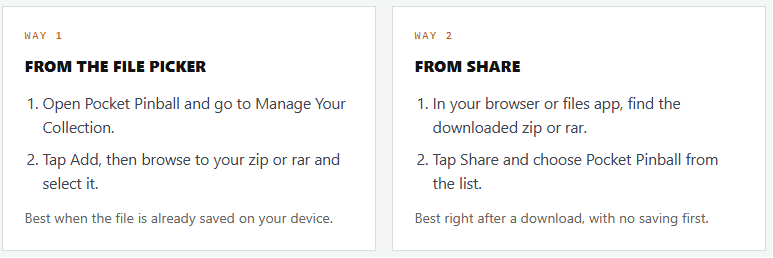
Two ways to add a zip or rar
However your .zip or .rar arrives, there are two ways to hand it to Pocket Pinball. Both end the same way: the app reads the archive and files every part into place.
Manage your collection
1a. Import via share
1b. Import via share
2 File Picker
03
folders
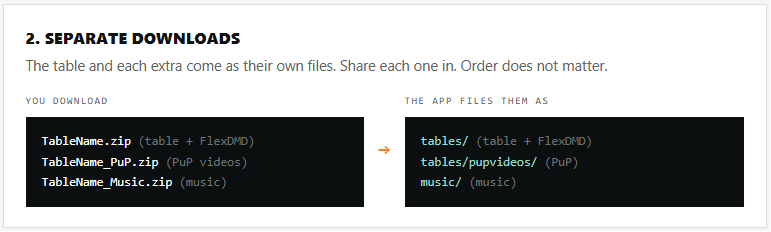
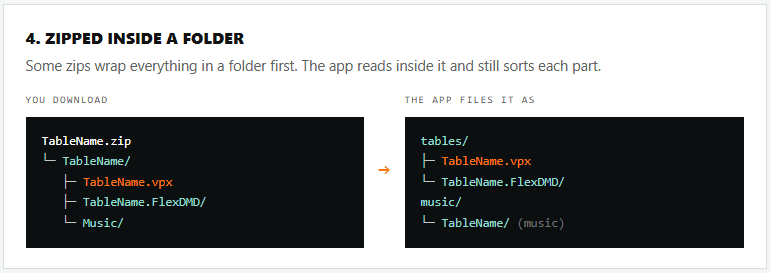
What your download might look like
04
missing
How to tell one is missing
A table missing an extra still loads. The missing piece simply does not appear, and the symptom tells you which one.
Black or blank DMD. The FlexDMD folder did not come across.
Static backglass, no video. The PuP-Pack is missing.
No background music. The music folder is missing.
The app also flags missing files with the amber warning on the table’s cover and a checklist when you load the table, the same as it does for a missing ROM.
Earn your Lieutenant Patch
Six quick questions. You cannot fail this one. A wrong answer just teaches.
What does a PuP-Pack add to a table?
A table plays fine but its DMD stays black. What is most likely missing?
How do you add these extras?
You open a zip or rar file and find the .vpx sitting next to a FlexDMD folder, a PuP folder and a Music folder. Which parts do you install?
An author ships the table in one download and its PuP videos as a separate download. What do you do?